Connectivity
Most presses aren't in the cloud.
A new line or a press from 1994: Chronos reads whatever is there. An ageing oven or a casting line is the same. You choose the signals.
Two signals are enough.
Press 2 · Shift B · 04:08–04:38
Press 2, 04:08 to 04:38: the ram pressure and 12 finished billets, and a stop at 04:22 that Chronos detected by itself.
For full control
- Order
- Billet length
- Run-out length
- Butt length
- Flying saw cut
Data collection
Step 1 of 8
Overview
From the PLC, through the gateway, into the cloud. Click any part for details.
Step 2 of 8
Siemens, directly
The gateway reads Siemens PLCs directly.
More
- No Kepware in between
- You choose the signals
Step 3 of 8
Others through Kepware
Every other PLC goes through Kepware.
More
- Seamlessly integrated into Chronos
- Managed by us or by you
Step 4 of 8
Orders and products
The gateway reads your databases too.
More
- SQL, ODBC, SAP, files or REST
- Each import on its own schedule
Step 5 of 8
Chronos Gateway
A small tool you can install anywhere.
More
- Collects the plant's data
- Sends it to the cloud, encrypted
Step 6 of 8
Encrypted, outbound only
Nothing has to be open inbound on your firewall.
Step 7 of 8
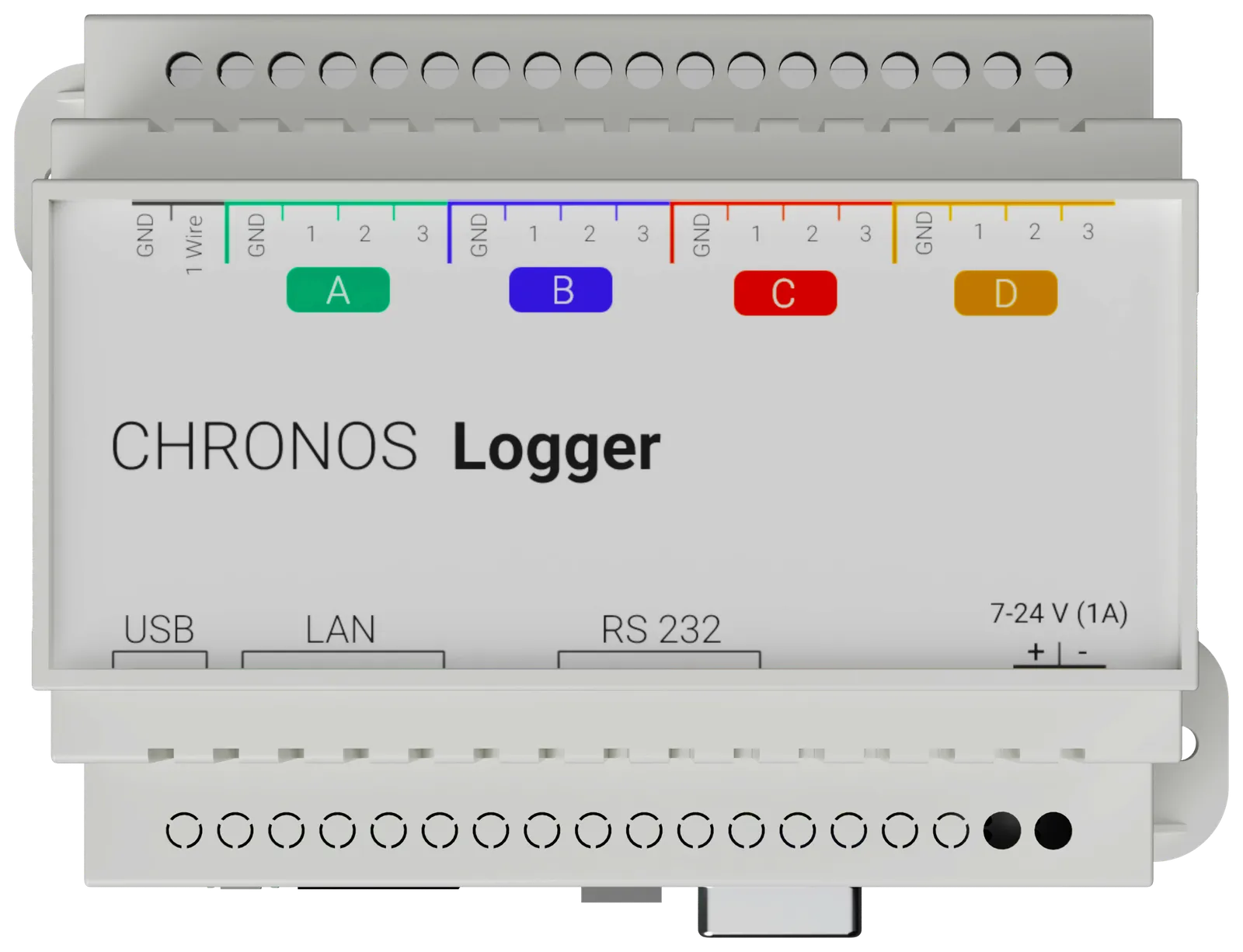
Data logger
For presses with no PLC to read. Sends straight to the cloud.
More
- 12 inputs: temperature, current, voltage, contacts
- Ethernet or Wi-Fi
- Buffers through network outages
Step 8 of 8
Visible anywhere
Chronos runs in Microsoft Azure. Everything opens in the browser.
More
- Stored with no expiry
- API, plus Excel and CSV export
Recipe management
Step 1 of 5
Overview
Chronos keeps a recipe for the die and writes the values to the press before the order starts.
Step 2 of 5
A recipe per die
Every die has its recipe, optionally per alloy, profile length and press.
More
- Full recipe management in Chronos
Step 3 of 5
Next order
At the terminal, the operator picks “Next Order”, with the exact die.
Step 4 of 5
Press control
From the order and the die, the values are written through the gateway to the PLC.
More
- Written before the start, so everything can be prepared
- Writing needs its own permission
Step 5 of 5
Checked at the press
The operator can check the values at the operator desk once more.
Data export
Your data is yours. Every billet Chronos records is ready for you at once.
Press 2 · Shift B
Billet 4205:33:32
Move along the band to see the data at any moment.Tap or drag along the band to see the data at any moment.
Excel and CSV
from reports, lists and dashboards
| Billet | Start | Cycle | Pressure | Temp. |
|---|---|---|---|---|
| 39 | 05:24:49 | 137 | 273 | 578 |
| 40 | 05:27:06 | 128 | 276 | 574 |
| 41 | 05:29:14 | 129 | 283 | 572 |
| 42 | 05:31:23 | 129 | 279 | 572 |
API
REST, access by token
GET /api/data/cycledata?machineName=Press%202&…Chronos-Token: chr_…[{ "Order": "24-1219", "Cycles": [ …,{"OrderCycleNr": 5,"Start": "2026-01-15T04:31:23+00:00","End": "2026-01-15T04:33:32+00:00","Columns": [{ "Name": "Pressure", "Value": 279.0, "Unit": "bar" },{ "Name": "Temperature", "Value": 572.0, "Unit": "tempC" }]}For your IT
Connection
- PLCs
- Siemens directly. All others through Kepware, run by us or by you.
- OPC UA
- The Chronos gateway reads OPC UA servers.
- Data logger
- MQTT over TLS, to Chronos or your broker. Ethernet or Wi-Fi with 802.1X.
Data
- Orders and products
- SQL Server, PostgreSQL, Oracle, ODBC, SAP IDoc, files over FTP/SFTP, REST, push.
- Recipes
- Per die. Further ones for alloy, length and press.
- Press control
- Written to the PLC before the order starts. Writing has its own permission.
- Export
- REST API with tokens, with or without an expiry. Excel and CSV.
Operation
- Security
- Outbound only, encrypted.
- Sign-in
- Local accounts, Microsoft Entra ID, or OpenID Connect. Access per site and per machine.
- Terminal
- Web app with a local cache. It keeps working when the plant network drops.
No PLC to read?
The Chronos data logger.
Twelve inputs that read the machine directly. The press needs no PLC or network port.
Download the data sheetPDF, 120 KB
Tell us about your press.
Make, year and control system are enough to start. We suggest a short meeting: which signals we read, how the connection is done, and what you see afterwards. No obligation.